TL;DR
- What makes an enterprise-ready AI agent system (the full capability checklist)
- SemanticStudio's architecture: 28 agents, 5 modes, 4-tier memory, GraphRAG-lite
- Why domain specialization beats general-purpose agents for production AI
Note: This project was formerly called AgentKit. The GitHub repo has been renamed to SemanticStudio.
I've spent the past year writing about AI-native architecture, context engineering, and agentic patterns. Theory is valuable—but at some point, theory needs to become code.
SemanticStudio is that code.
It's an open-source, production-grade multi-agent chat platform that implements every idea I've been exploring. Not a demo. Not a prototype. A working system you can deploy on your own infrastructure, point at your own data, and use to build real enterprise AI applications.
28
Domain Agents
5
Chat Modes
4-Tier
Memory Architecture
Real-time
Eval + Observability
The Problem I Set Out to Solve
Every week on LinkedIn, I see the same posts:
"Here are the skills you need to build enterprise RAG systems..."
"Your AI assistant needs reasoning, memory, and grounding..."
"Multi-agent architectures are the future..."
And they're right. But there's a gap between knowing what you need and having something that works.
Most enterprise AI chat systems fall into two camps:
- Too simple: Single-agent, no memory, basic RAG, works in demos, fails in production
- Too complex: Requires a team of ML engineers, massive infrastructure, and months of development
I wanted something in the middle: sophisticated enough for real enterprise use cases, simple enough to run and customize yourself.
The Enterprise AI Checklist
These are the capabilities that LinkedIn says enterprises need. SemanticStudio has all of them.
Everything Enterprises Need to Build Production AI
These are the capabilities that LinkedIn says you need for enterprise AI. SemanticStudio has all of them.
13
Enterprise Capabilities
100%
Checklist Complete
0
Missing Features
That's not marketing. Every one of those capabilities is implemented, configurable, and ready to use.
What Makes SemanticStudio Different
Reasoning LLMs That Show Their Work
SemanticStudio doesn't just use LLMs—it uses them intelligently. The system can leverage reasoning models like o3-deep-research for complex queries, while using faster models for quick lookups.
More importantly, it shows you the reasoning. The trace panel reveals:
- Which mode was selected and why
- Which agents were activated
- What was retrieved from memory and knowledge
- How the response was evaluated
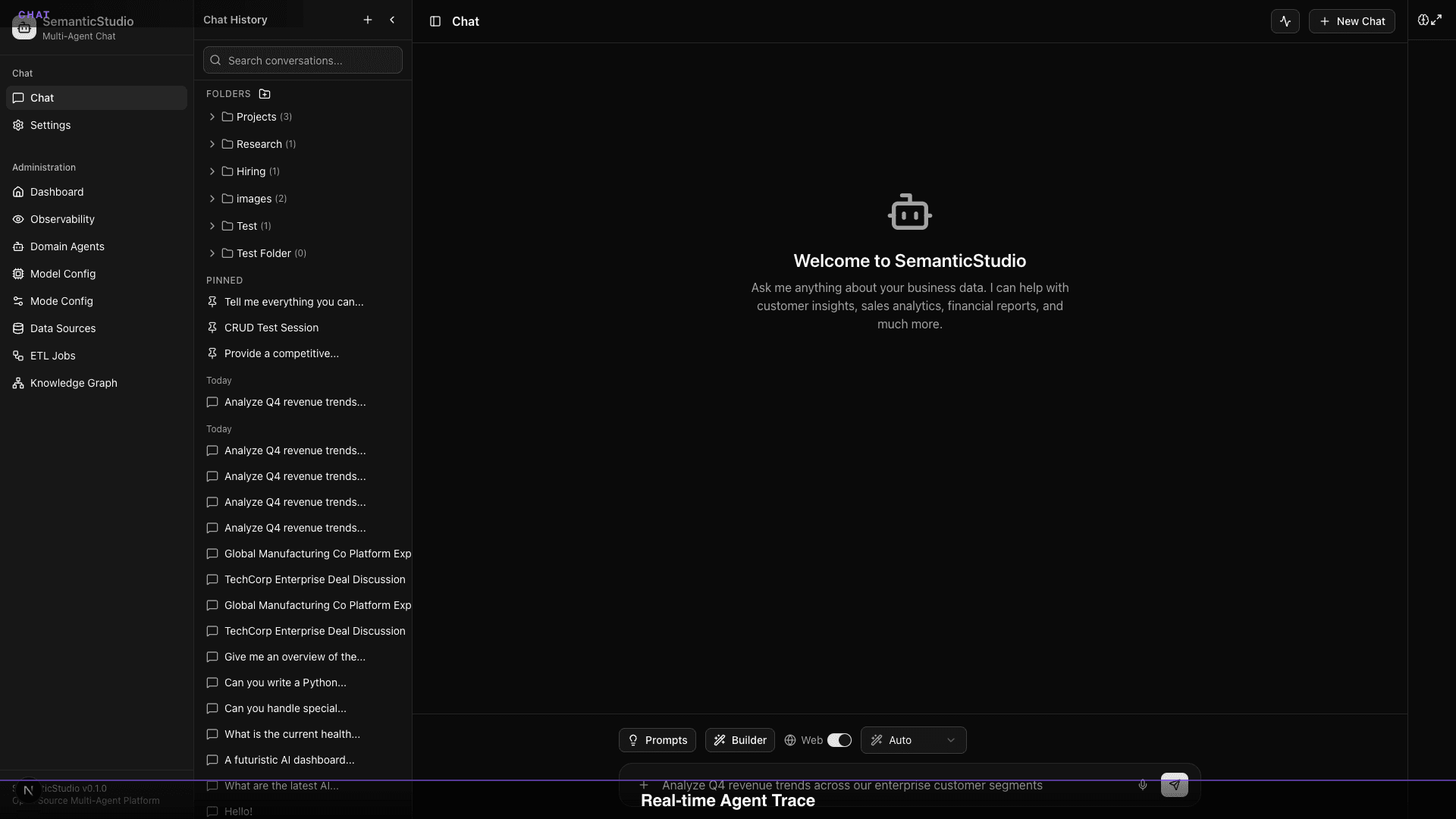
Transparency isn't a nice-to-have in enterprise AI—it's a requirement.
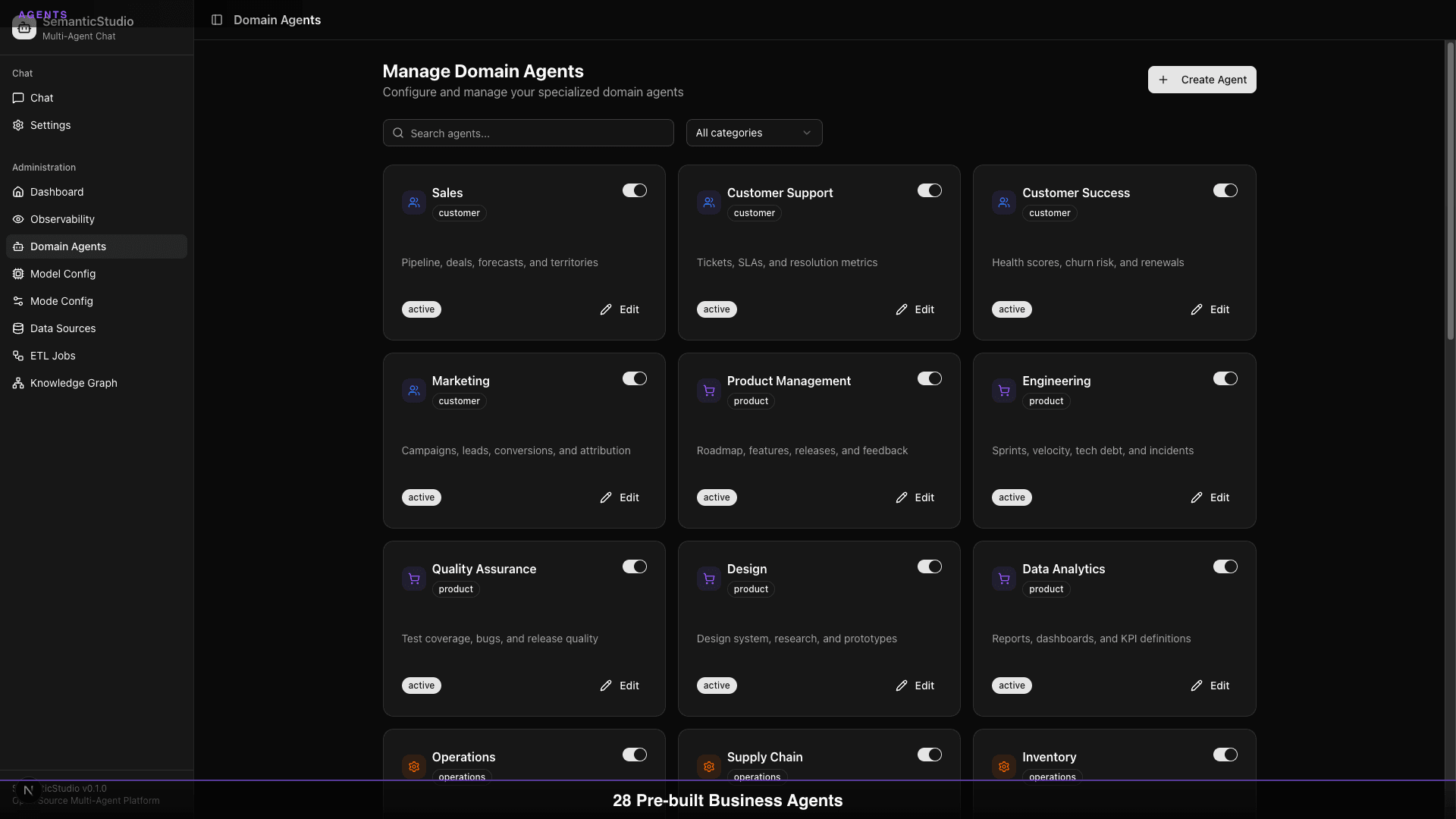
28 Domain Agents, Your Control
SemanticStudio ships with 28 specialized domain agents covering:
- Customer Intelligence: Profiles, sales, support, success, marketing
- Product & Engineering: Product management, engineering, QA, design, analytics
- Operations: Operations, supply chain, inventory, procurement, facilities
- Finance & Legal: Finance, accounting, legal, compliance, risk
- People: HR, talent, learning, IT support, communications
- Intelligence: Competitive, business, strategic planning
But here's what matters: you control which agents are active. Don't need procurement? Disable it. Want to customize the customer agent? Edit its system prompt. Need a new agent for your specific domain? The ETL system can create one automatically.
Five Configurable Modes
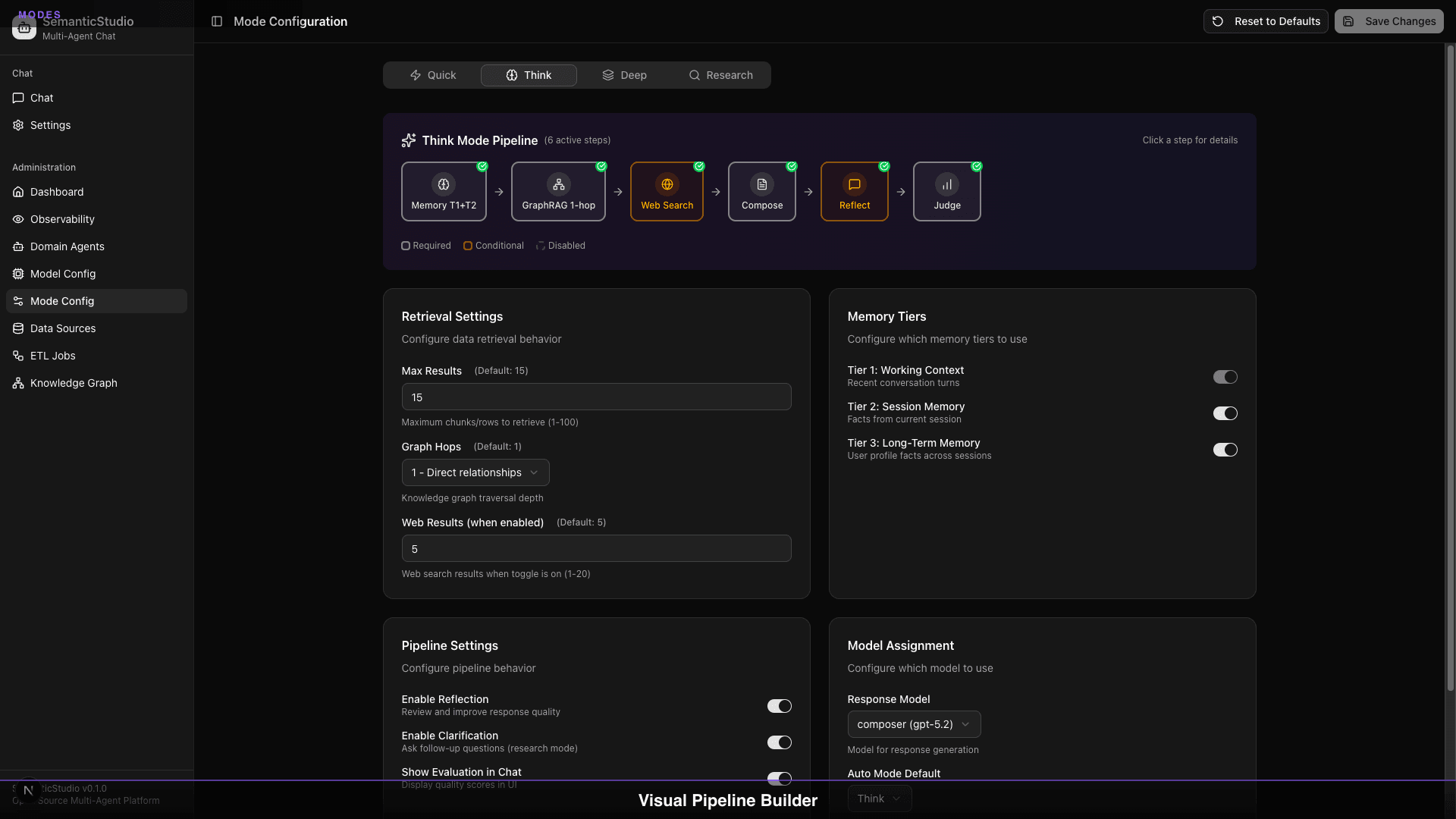
Not every question needs the same depth. SemanticStudio has five modes:
| Mode | What It Does | When to Use |
|---|---|---|
| Auto | LLM classifier selects best mode | Default for new users |
| Quick | Fast lookup, minimal context | Simple factual queries |
| Think | Balanced retrieval, reflection | Standard questions |
| Deep | Extended reasoning, full memory | Complex analysis |
| Research | Multi-step exploration, clarification | Deep investigation |
Each mode is fully configurable: max results, graph hops, memory tiers, reflection, model selection. You control the cost vs. quality tradeoff.
Prompt Library
Accelerate workflows with pre-built templates and parameterized prompts:
- Quick-access dropdown for saved prompts
- Parameterized templates with fill-in-the-blank variables
- Built-in templates: Compare Items, Analyze Trends, Explain Concept, Create Summary, Set Goal
Task Agent Framework
SemanticStudio doesn't just answer questions—it can take action:
- Human-in-loop mode for mutations and high-risk operations
- Human-out-of-loop mode for lookups and low-risk queries
- Capability-based routing to the right agent
- Full event observability for debugging and audit trails
4-Tier Memory System
I've written about context engineering as the key discipline for building effective AI systems. SemanticStudio implements a 4-tier memory architecture inspired by MemGPT:
- Tier 1: Working Context — Last 3 exchanges, always in context
- Tier 2: Session Memory — Relevant facts from current session, with rolling window compression
- Tier 3: Long-term Memory — User profile facts that persist across sessions
- Tier 4: Context Graph — Links your conversation history to domain knowledge graph entities
The memory extractor identifies facts worth keeping. Rolling window summarization handles unlimited conversation length. The Context Graph lets you ask "What did I discuss about Customer X?" and get answers grounded in your actual conversations.
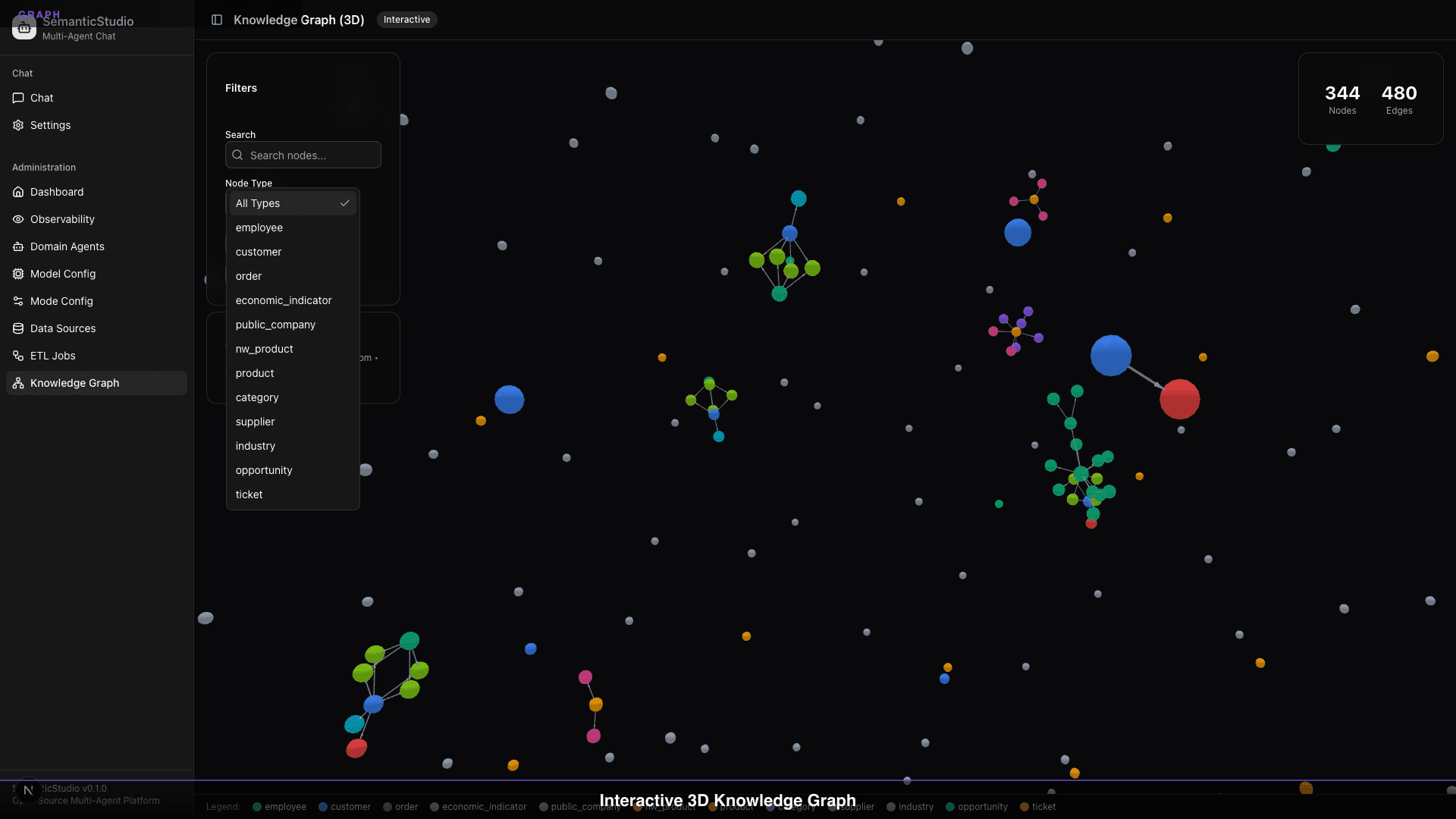
GraphRAG-lite: Beyond Vector Similarity
Vector similarity is powerful but limited. "What documents are semantically close?" is a different question from "What entities are connected?"
SemanticStudio includes GraphRAG-lite:
- Entity Resolution: Identify and link entities across your data
- Knowledge Graph: 3D visualization of relationships
- Graph Hops: Configure traversal depth per mode (0-3 hops)
- Hybrid Retrieval: Combine vector and graph results
Self-Learning ETL
Most RAG systems make you manage data ingestion yourself. SemanticStudio's ETL uses Plan-Act-Reflect (PAR) loops:
- Plan: Analyze source schema, determine strategy
- Act: Execute transformation, populate vector store and graph
- Reflect: Evaluate results, learn from errors
The ETL doesn't just ingest data—it can create new domain agents automatically when you add new data sources.
Production-Grade Quality
This is what separates demos from deployable systems:
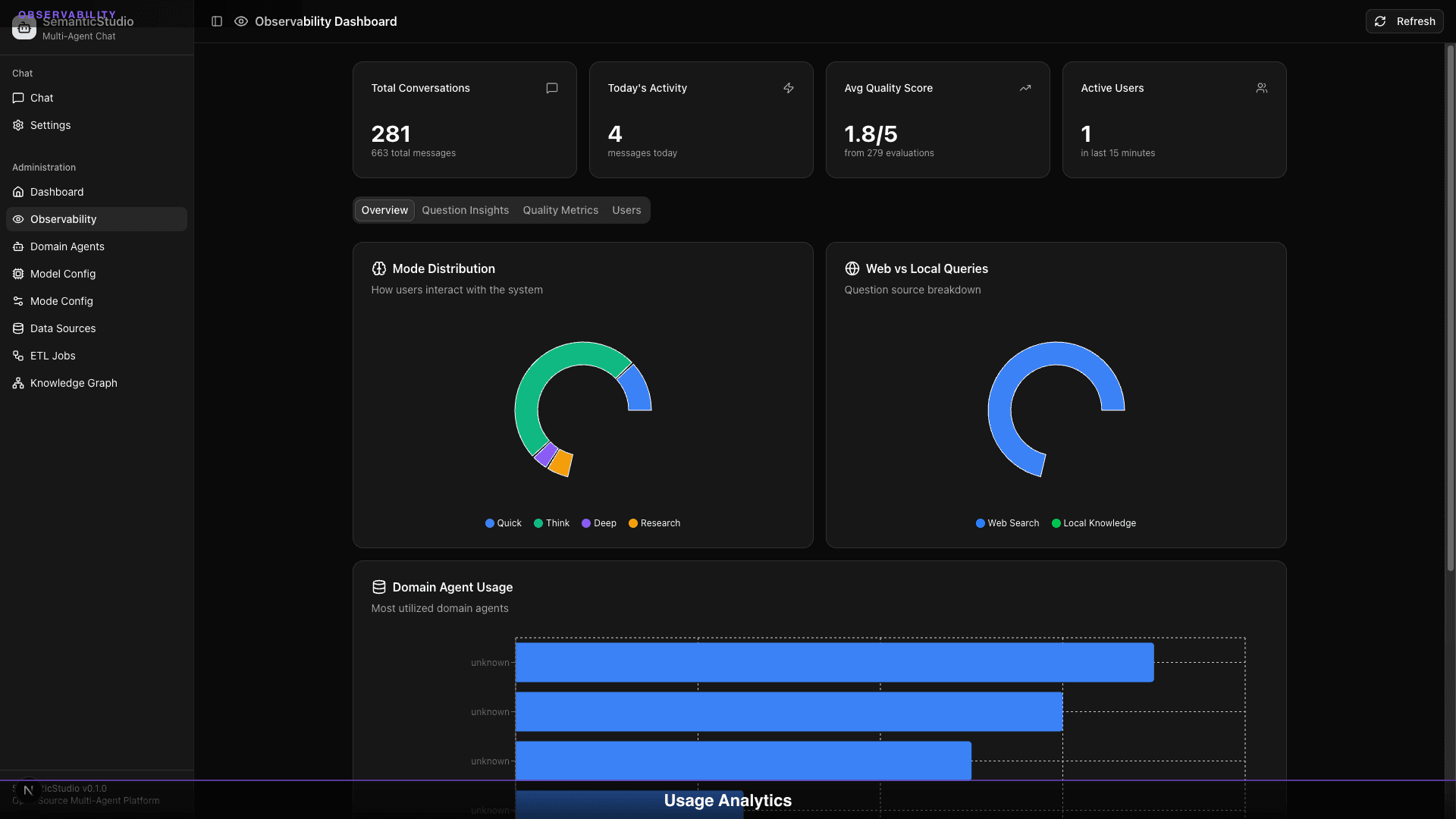
- 4-dimension quality scoring: Relevance, Groundedness, Coherence, Completeness
- Real-time hallucination detection: Claims verified against sources
- Full observability: Sessions, messages, quality trends, agent usage
- Error handling: Circuit breakers, fallbacks, typed APIs
The Architecture
SemanticStudio implements what I've been calling AI-native architecture. The LLM isn't an add-on—it's the core of the system.
SemanticStudio Architecture
Click any layer to explore, or watch the data flow
Every layer is designed to work together:
- Chat Interface handles user experience, streaming, file uploads
- Agent Orchestration routes queries to the right domain agents
- Reasoning Engine generates, reflects on, and evaluates responses
- Retrieval Layer combines vector search and graph traversal
- Memory System manages context across tiers
- Knowledge Store persists embeddings, graphs, and configurations
See It In Action
The architecture diagram shows the components. But how do they actually work together? Here's the complete query pipeline, animated step-by-step for each mode:
How SemanticStudio Processes Your Query
Watch the pipeline in action for each mode
"What's the churn risk for our enterprise customers?"
Analysis query → Think mode
Notice how the pipeline adapts: Quick mode skips reflection and web search for speed. Research mode engages multiple agents, full graph traversal, and comprehensive evaluation. Same architecture, different depth.
Multi-Provider LLM Support
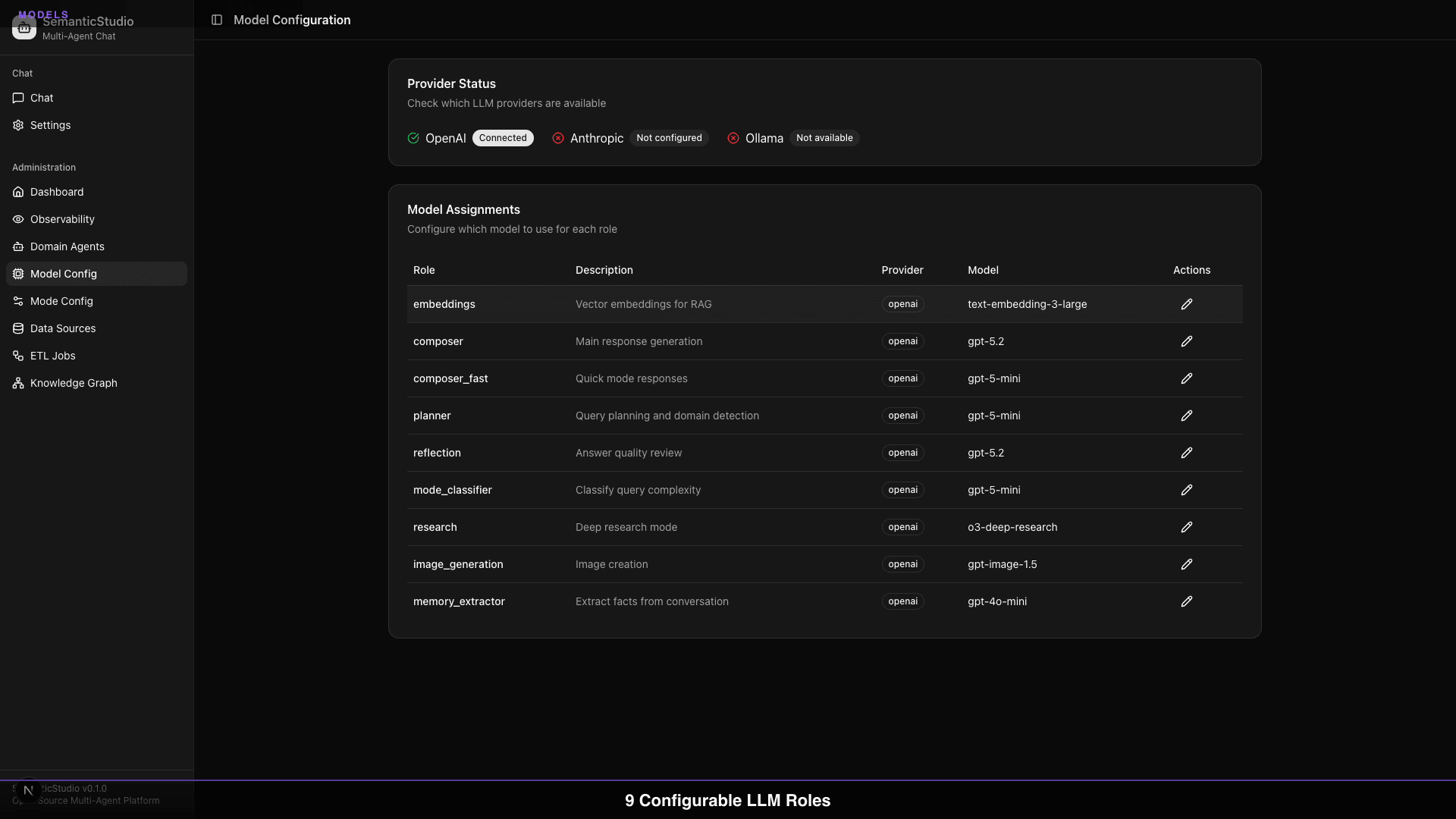
You're not locked into one provider. SemanticStudio supports:
- OpenAI: GPT-5.2, GPT-5-mini, o3-deep-research
- Anthropic: Claude models
- Ollama: Local models for private data
You can mix and match providers by role. Use OpenAI for reasoning, Ollama for embeddings, Anthropic for reflection. Your call.
What This Series Will Cover
This is Part 1 of an 8-part series. I'm going to walk through every major system in SemanticStudio:
Building SemanticStudio
A deep dive into every feature, from chat UX to self-learning ETL pipelines
By the end, you'll understand not just how SemanticStudio works, but the architecture decisions behind it—why certain tradeoffs were made, what patterns emerged, and what I'd do differently next time.
Try It Yourself
SemanticStudio is open source, MIT licensed, and ready to deploy.
GitHub: https://github.com/Brianletort/SemanticStudio
The README has everything you need to get started: prerequisites, setup instructions, configuration options.
This isn't the AI future I read about. It's the AI future I built.
Next up: Part 2 — The Chat Experience, where we'll dive into sessions, folders, file handling, and all the features that make SemanticStudio actually usable.
Building SemanticStudio
Part 1 of 8