TL;DR
- Self-learning ETL with Plan-Act-Reflect loops
- Automatic knowledge graph population from data sources
- New domain agents created automatically when you add data
Most RAG systems make data ingestion your problem.
SemanticStudio makes it a feature: self-learning ETL pipelines that don't just ingest data—they build knowledge graphs and create new agents automatically.
The ETL Vision
Traditional ETL:
Data Source → Transform → Load → Done
SemanticStudio ETL:
Data Source → Understand → Transform → Load →
  → Populate Vector Store
  → Build Knowledge Graph
  → Create/Link Domain Agent
  → Learn for Next Time
The ETL system is intelligent. It adapts. It improves.
Plan-Act-Reflect (PAR) Loops
At the heart of SemanticStudio's ETL is the PAR pattern—the same self-learning loop I've written about in Self-Learning Pipelines.
Plan-Act-Reflect (PAR) Loop
Self-learning ETL that improves over time
Plan
Analyze source and determine strategy
Act
Execute transformation and capture results
Reflect
Evaluate results and learn for next time
Phase 1: Plan
Before touching data, the system plans:
- Schema Analysis: What does this source look like?
- Issue Prediction: What might go wrong?
- Strategy Selection: How should we transform this?
- Resource Estimation: How long will this take?
The planner uses learned patterns from previous runs.
Phase 2: Act
Execute the plan:
- Data Extraction: Pull from source
- Transformation: Clean, normalize, enrich
- Vector Store Population: Create embeddings, store chunks
- Knowledge Graph Update: Extract entities, build relationships
Phase 3: Reflect
Evaluate and learn:
- Quality Assessment: Did it work?
- Error Analysis: What went wrong?
- Strategy Update: How should we adapt?
- Learning Storage: Remember for next time
The reflect phase is what makes the system self-learning.
ETL Jobs Dashboard
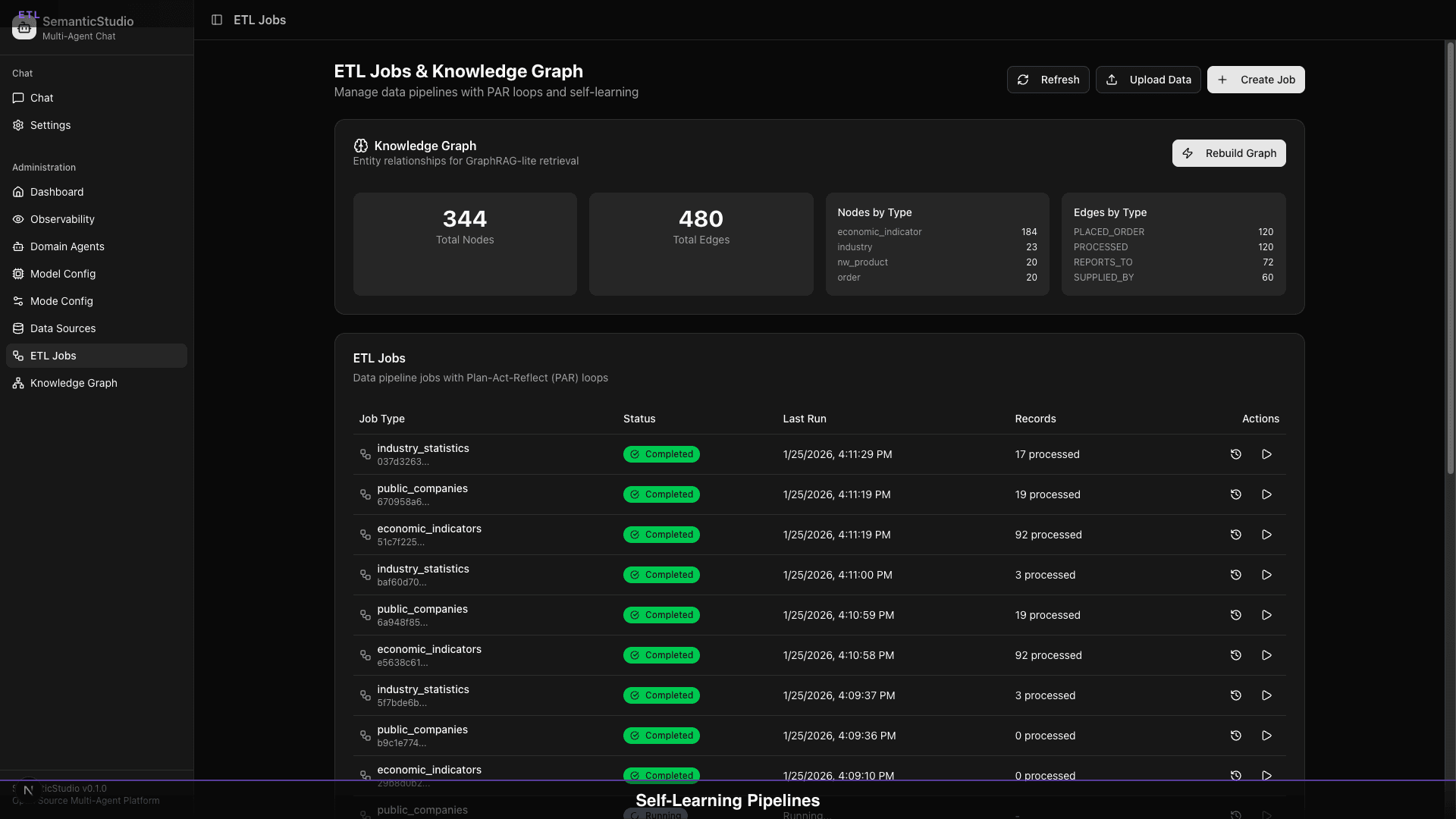
The dashboard shows:
- Job List: All ETL jobs with status
- Knowledge Graph Stats: 344 nodes, 320 edges
- Nodes by Type: Distribution across entity types
- Edges by Type: Relationship distribution
Job Status
| Status | Meaning |
|---|---|
| Completed | Successfully finished |
| Running | Currently executing |
| Failed | Error occurred |
| Scheduled | Waiting to run |
Job Actions
For each job:
- View Details: See configuration and logs
- Re-run: Execute again
- Edit: Modify settings
- Delete: Remove job
Data Sources
SemanticStudio supports multiple source types:
Supported Sources
| Source Type | What It Handles |
|---|---|
| PostgreSQL | Database tables |
| CSV | Flat files |
| JSON | Structured documents |
| REST API | External services |
| Documents | PDF, DOCX, etc. |
Data Sources Dashboard
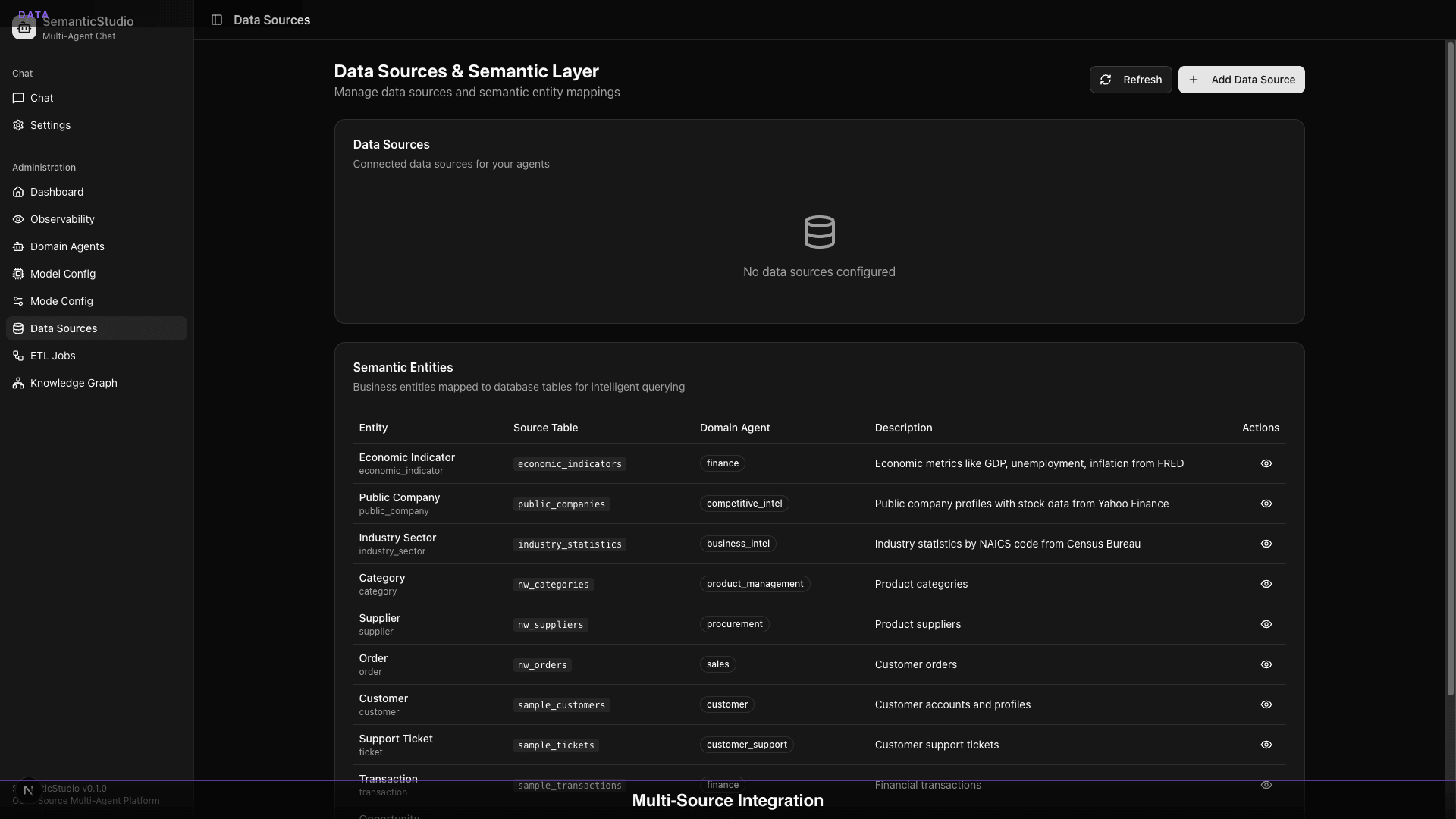
The semantic layer maps:
- Source Table → Entity Type
- Columns → Entity Properties
- Domain Agent → Data Access
Adding a Data Source
- Select source type (Postgres, CSV, etc.)
- Provide connection details
- Map entities to the semantic layer
- Link to domain agent (or create new)
- Run initial ETL
Database Population
When ETL runs, it populates two stores:
Vector Store (RAG)
- Chunking: Break documents into segments
- Embedding: Generate vectors (text-embedding-3-large)
- Indexing: Store in pgvector for retrieval
- Metadata: Preserve source info, timestamps
Knowledge Graph
- Entity Extraction: Identify entities in content
- Relationship Inference: Detect connections
- Graph Population: Add nodes and edges
- Deduplication: Merge duplicate entities
Creating New Domain Agents
Here's where it gets powerful: ETL can create agents automatically.
When to Create a New Agent
The system recommends a new agent when:
- Data doesn't fit existing domains
- New entity types are discovered
- User explicitly requests
- Coverage gap is detected
Agent Creation Workflow
- Data Analysis: What domain does this data represent?
- Agent Proposal: "This looks like a Procurement domain"
- System Prompt Generation: Create domain-specific instructions
- Data Source Linking: Connect new source to agent
- Activation: Enable agent and test
Example: Adding Procurement Data
1. Upload: procurement_contracts.csv

2. ETL Analysis:
   - Entity types: Vendor, Contract, PurchaseOrder
   - Domain signal: Procurement/Purchasing
   - No existing agent covers this

3. Proposal:
   "Create 'Procurement' agent?"
   Description: Vendors, contracts, purchases
   Category: Operations

4. Accept:
   - Agent created with generated system prompt
   - Data source linked
   - ETL completes
   - Agent enabled

5. Ready:
   "What contracts expire this quarter?"
   → Procurement agent responds with data
Expanding Existing Agents
Not every data source needs a new agent. Often, you're adding data to an existing domain.
Linking Additional Sources
- Select existing agent
- Add new data source
- Configure mapping
- Run ETL
Multiple Sources per Agent
An agent can have multiple sources:
Customer Intelligence Agent:
  - CRM database (customer records)
  - Support system (ticket history)
  - Survey data (satisfaction scores)
  - Marketing (campaign responses)
All sources are available when the agent responds.
Source Priority
When sources overlap, configure priority:
- Primary: CRM (authoritative customer data)
- Secondary: Support (supplemental context)
- Tertiary: Marketing (additional signals)
Agent Lifecycle Management
As your system evolves, you need to manage agents:
Enable/Disable Agents
- Disable agents during data refresh
- Enable when data is ready
- Disable unused agents to reduce routing complexity
Maintenance Mode
Set agents to maintenance when:
- Running large ETL jobs
- Updating system prompts
- Validating data quality
Queries route to other agents during maintenance.
Retiring Agents
When an agent is no longer needed:
- Disable the agent
- Archive or delete data sources
- Remove agent from system
Historical data can be preserved even if agent is removed.
Self-Learning in Action
The PAR loop learns from each run:
Learning: Schema Drift
Run 1: Source has columns [A, B, C]
Run 2: Source now has columns [A, B, C, D]

Reflect: New column D detected
Plan (next run): Include D in transformation
Learning: Data Quality
Run 1: 5% of records failed validation
Reflect: Common issue is NULL in required field

Plan (next run): Add NULL handling for that field
Run 2: 0.5% failure rate (10x improvement)
Learning: Performance
Run 1: 10,000 records took 5 minutes
Reflect: Bottleneck in embedding generation

Plan (next run): Batch embeddings differently
Run 2: 10,000 records in 2 minutes (2.5x faster)
Best Practices
Start with Core Domains
Begin with agents that have:
- Clear data sources
- High usage potential
- Well-defined boundaries
Iterate on System Prompts
After initial agent creation:
- Review generated prompt
- Customize for your context
- Test with real queries
- Refine based on results
Monitor ETL Health
Watch for:
- Increasing failure rates
- Slowing processing times
- Growing error logs
These signal data source issues.
Regular Graph Rebuilds
Periodically rebuild the knowledge graph to:
- Incorporate new relationships
- Clean up stale entities
- Optimize graph structure
What's Next
Data is flowing. Agents are created. Queries are routed. But how do you know if the system is working well?
Next up: Part 8 — Production Quality, where we cover quality evaluation, hallucination detection, and the observability that makes SemanticStudio enterprise-ready.
Building SemanticStudio
Part 7 of 8