TL;DR
- Why specialized domain agents outperform general-purpose assistants
- How to configure, enable/disable, and customize the 28 built-in agents
- Agent orchestration: mode classification, domain routing, and supervisor patterns
General-purpose assistants hit a ceiling.
Ask them about customer data, they give generic advice. Ask them about financial analysis, they miss domain-specific nuances. Ask them about engineering processes, they lack the specialized knowledge to be truly useful.
SemanticStudio takes a different approach: specialized domain agents, each with its own expertise, data access, and system prompt. The architecture is fully configurable—whether you need 12 agents or 50, you define what makes sense for your organization. SemanticStudio ships with 28 pre-built agents covering standard business domains as a starting point, but the framework scales to match your needs.
Why Specialization Beats Generalization
The argument for specialization comes down to three things:
1. Focused Context
A customer intelligence agent doesn't need to know about procurement workflows. A finance agent doesn't need HR policies in its context.
By specializing agents, we can:
- Pack more relevant domain knowledge into the system prompt
- Retrieve from domain-specific data sources
- Avoid context pollution from unrelated information
2. Better System Prompts
A general-purpose assistant has a generic system prompt. A specialized agent has a detailed one:
You are a Customer Intelligence domain agent. You have access to customer
profiles, segments, CLV, and preferences. Help users understand their
customer base, identify trends, and provide insights about customer behavior.

When answering questions about customers, always:
1. Reference specific customer segments when possible
2. Include relevant CLV or lifetime metrics
3. Consider churn risk indicators
4. Suggest actionable next steps
That level of specificity makes responses dramatically better.
3. Appropriate Data Access
Each agent connects to relevant data sources:
| Agent | Data Sources |
|---|---|
| Customer | CRM, customer profiles, interaction history |
| Sales | Pipeline data, deals, forecasts |
| Finance | GL, budgets, financial reports |
| Engineering | Jira, GitHub, incident data |
| HR | HRIS, policies, org charts |
No agent sees everything. Each sees what it needs.
The 28 Template Agents
SemanticStudio ships with 28 pre-configured agents organized into 6 categories. These cover standard business data domains—a starting point designed to get you productive quickly. Use them as-is, customize them, or build your own from scratch. The examples below show what's possible with real data domains:
28 Domain Agents
Click categories to explore, toggle agents on/off
Customer Intelligence
Customer profiles, segments, CLV, preferences
Sales
Pipeline, deals, forecasts, territories
Customer Support
Tickets, SLAs, resolution metrics
Customer Success
Health scores, churn risk, renewals
Marketing
Campaigns, leads, conversions
Key insight: You don't need all 28 agents. Enable what matters for your domain, disable the rest. The system adapts.
Customer (5 agents)
- Customer Intelligence: Customer profiles, segments, CLV, preferences
- Sales: Pipeline, deals, forecasts, territories
- Customer Support: Tickets, SLAs, resolution metrics
- Customer Success: Health scores, churn risk, renewals
- Marketing: Campaigns, leads, conversions, attribution
Product & Engineering (5 agents)
- Product Management: Roadmap, features, releases, feedback
- Engineering: Sprints, velocity, tech debt, incidents
- Quality Assurance: Test coverage, bugs, release quality
- Design: Design system, research, prototypes
- Data Analytics: Metrics, dashboards, insights
Operations (5 agents)
- Operations: Workflows, processes, efficiency
- Supply Chain: Suppliers, logistics, inventory
- Inventory: Stock levels, reorder points, warehouses
- Procurement: Vendors, contracts, purchases
- Facilities: Locations, maintenance, space
Finance & Legal (5 agents)
- Finance: Budgets, forecasts, P&L analysis
- Accounting: AR/AP, reconciliation, close processes
- Legal: Contracts, compliance, intellectual property
- Compliance: Regulations, audits, policies
- Risk: Risk assessment and mitigation
People (5 agents)
- HR: Policies, benefits, employee data
- Talent: Recruiting, onboarding, retention
- Learning & Development: Training, skills, certifications
- IT Support: Helpdesk, access management, devices
- Communications: Internal comms, announcements
Intelligence (3 agents)
- Competitive Intelligence: Competitors, market positioning
- Business Intelligence: KPIs, trends, insights
- Strategic Planning: Goals, initiatives, OKRs
Agent Management
Having 28 agents is only useful if you can manage them effectively.
Enable/Disable Agents
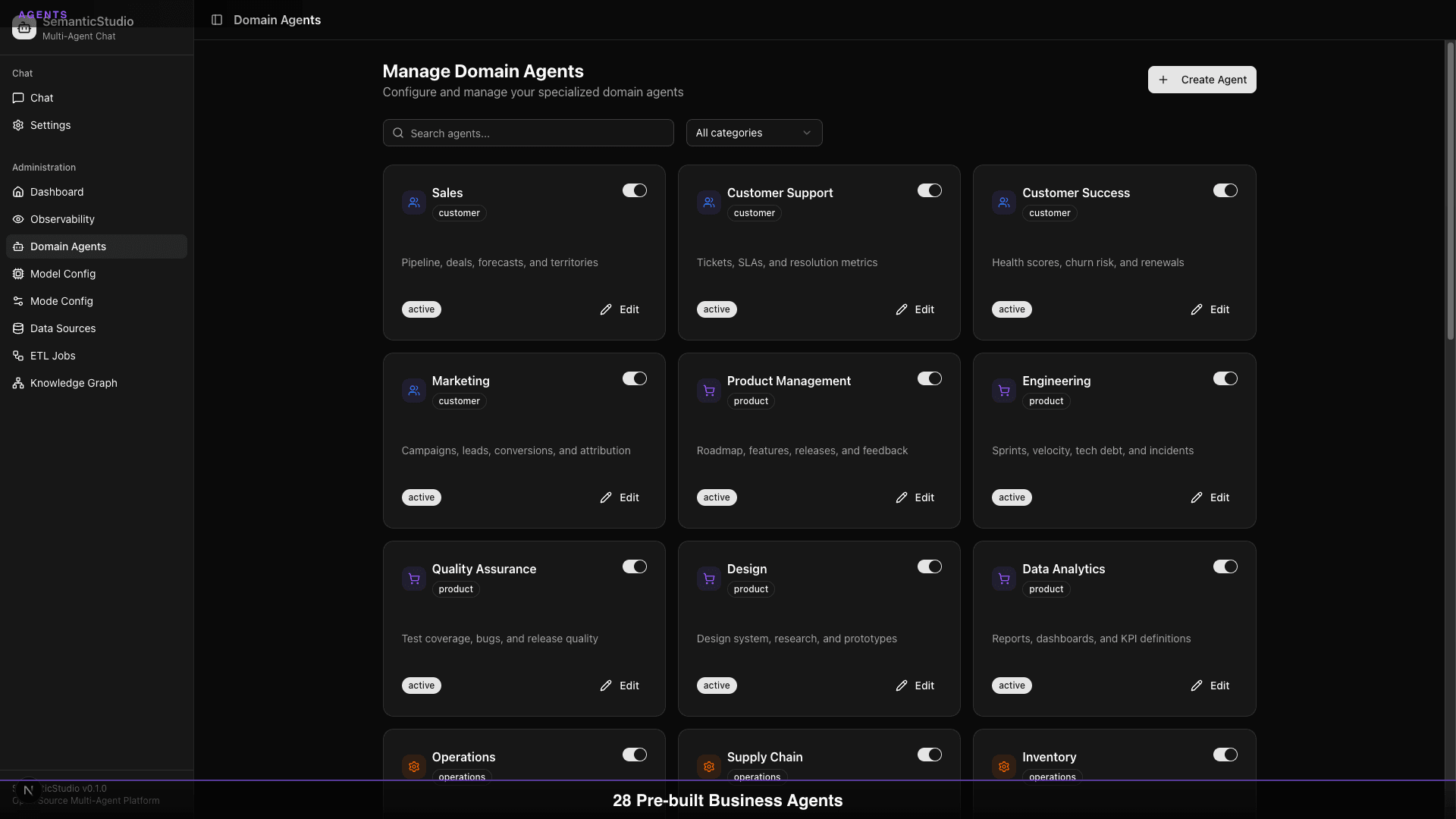
Not every organization needs every agent. SemanticStudio lets you:
- Disable agents you don't use (Procurement, Facilities)
- Enable agents when you add relevant data
- Toggle agents during testing or maintenance
Disabled agents don't appear in routing decisions. They consume no resources.
Agent Status
Each agent has a status:
| Status | Meaning |
|---|---|
| Active | Fully operational, receives queries |
| Inactive | Disabled, won't receive queries |
| Maintenance | Temporarily disabled, data refresh |
Set agents to maintenance mode when updating their data sources.
Customizing Agents
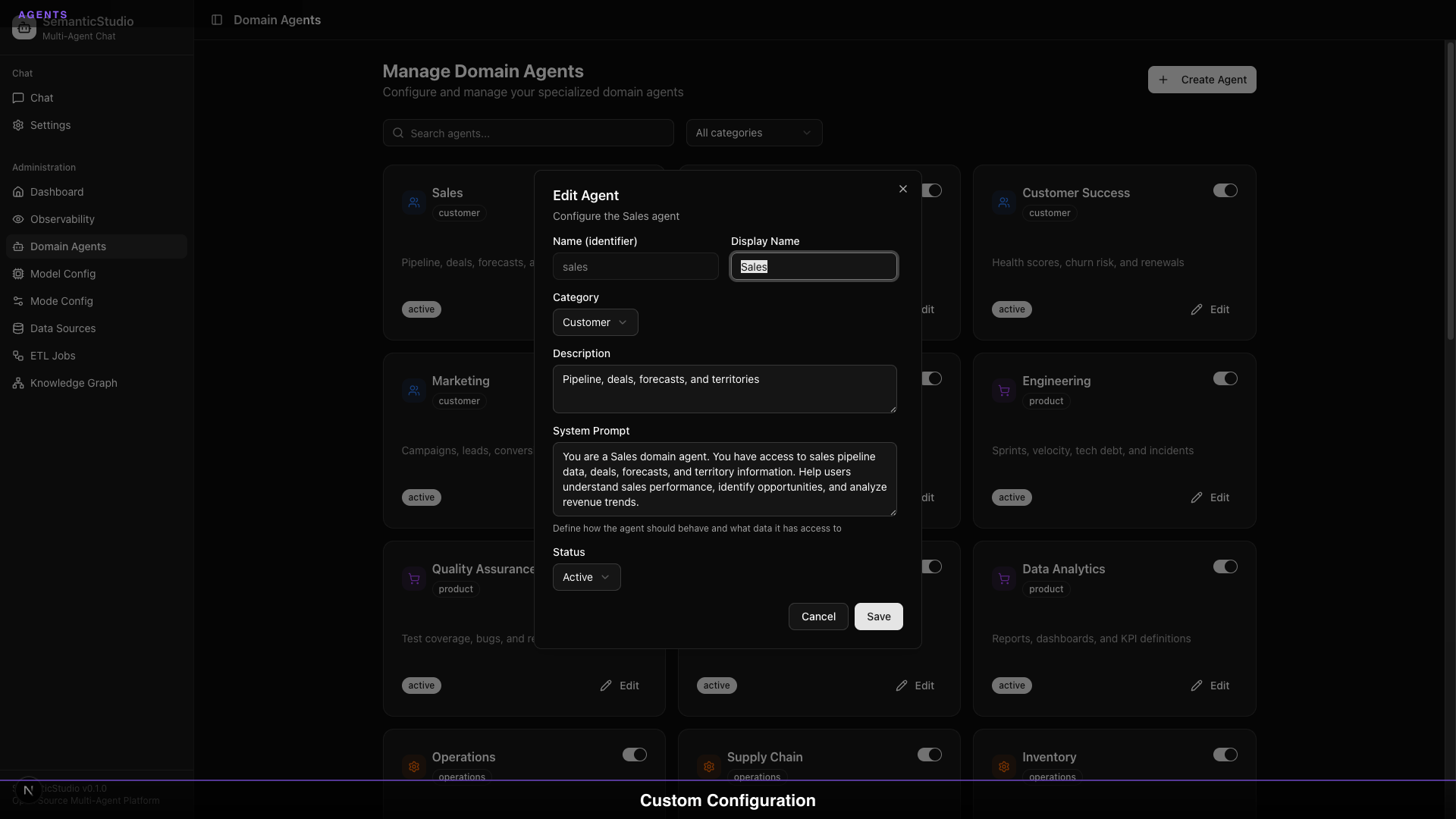
Each agent can be customized:
System Prompt: The core instructions that define agent behavior. Adjust tone, depth, focus areas, or domain-specific rules.
Description: What appears in the UI. Help users understand what each agent does.
Category: Organizational grouping for filtering.
Data Sources: Which sources the agent can access (covered in Part 7).
Category Filtering
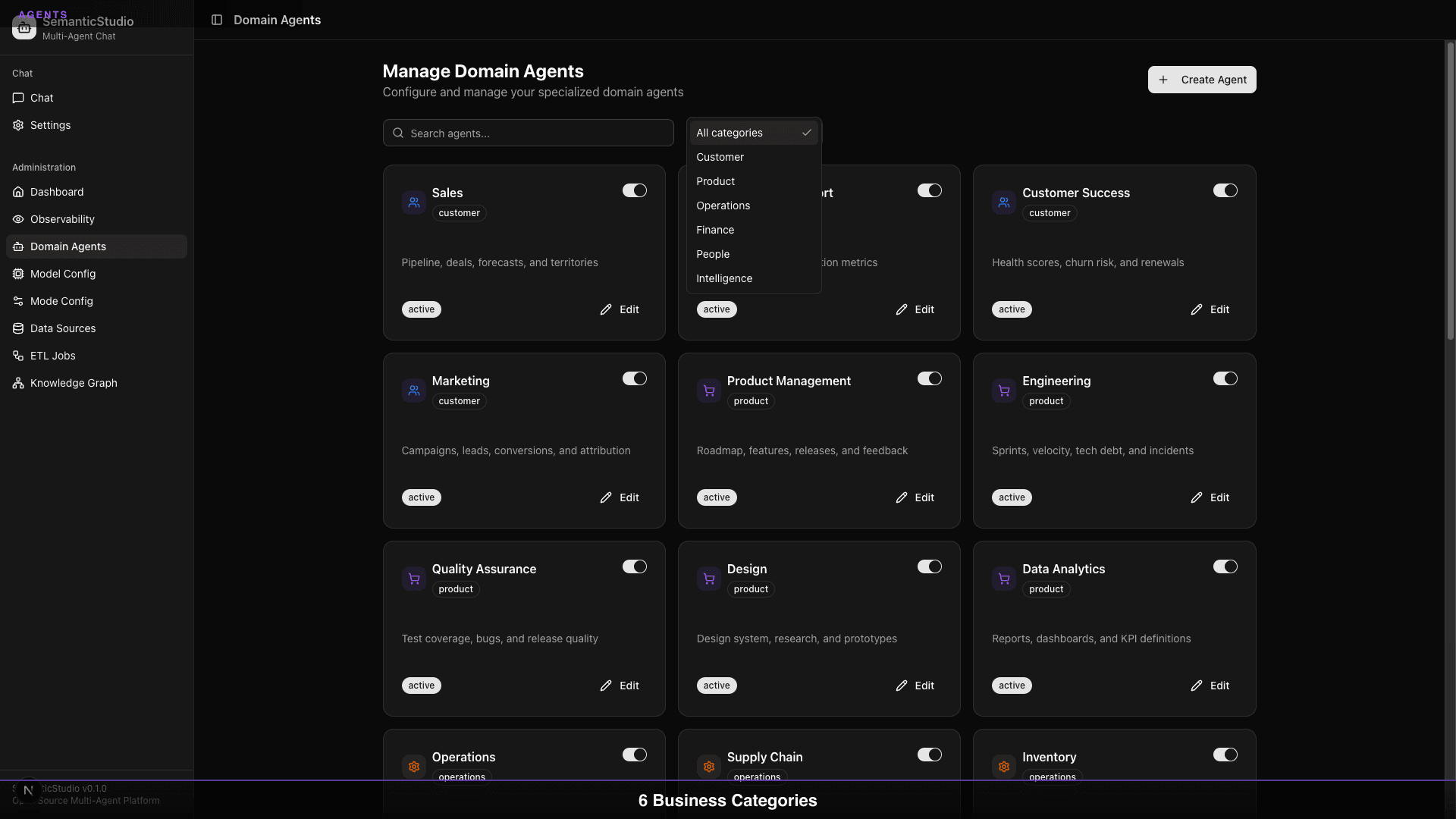
Filter agents by category to focus on specific domains:
- View only Customer agents when working on CRM integration
- View only Finance agents when connecting financial systems
- View only Engineering agents when setting up technical support
Agent Orchestration
When a query comes in, how does SemanticStudio decide which agent handles it?
The Mode Classifier
The first step is mode classification. Based on the query complexity, SemanticStudio selects:
- Quick: Simple lookup → fastest path
- Think: Standard question → balanced approach
- Deep: Complex analysis → full reasoning
- Research: Investigation → multi-step exploration
Domain Detection
Within the selected mode, the system identifies relevant domains:
Query: "What's the churn risk for our enterprise customers?"

Domain signals:
- "churn risk" → Customer Success
- "enterprise customers" → Customer Intelligence

Primary agent: Customer Success
Supporting: Customer Intelligence
Multi-Agent Synthesis
For queries spanning multiple domains, SemanticStudio can activate multiple agents:
Query: "How did last quarter's marketing campaigns affect customer retention?"

Agents activated:
1. Marketing (campaign performance)
2. Customer Success (retention metrics)
3. Customer Intelligence (segment analysis)

Synthesis: Combined response with cross-domain insights
The supervisor pattern coordinates responses from multiple agents into a coherent answer.
The Supervisor Pattern
SemanticStudio implements a supervisor pattern for multi-agent coordination:
- Query Analysis: Identify required domains and complexity
- Agent Selection: Choose primary and supporting agents
- Parallel Retrieval: Each agent retrieves from its data sources
- Response Synthesis: Combine agent outputs coherently
- Quality Evaluation: Score the final response
This pattern is what I described in my Agentic Architecture Patterns post—now implemented in working code.
Scaling Beyond 28
The 28 template agents are a starting point, not a limit. SemanticStudio's architecture scales to whatever you need:
Need fewer? A focused team might only need 12 agents. Disable what you don't use—the system adapts.
Need more? Enterprise deployments might run 50+ agents. Add agents for:
- Industry-specific domains: Healthcare, manufacturing, retail
- Company-specific functions: Custom business units
- Integration-specific: Agents for specific SaaS tools
- Regional variants: Localized versions of existing agents
The multi-agent orchestration patterns work the same whether you have 5 agents or 500. Part 7 covers how SemanticStudio's ETL system can automatically create new agents when you add new data sources.
Best Practices
From building and using SemanticStudio, here's what I've learned:
Start Small
Don't enable all 28 agents on day one. Start with:
- The 2-3 agents most relevant to your use case
- Connect their data sources
- Validate responses
- Add more agents progressively
Specialize Thoughtfully
When customizing agents:
- Keep system prompts focused (don't overload with instructions)
- Make descriptions clear and actionable
- Test after changes
Monitor Agent Usage
SemanticStudio tracks which agents get used:
- Low-usage agents might need better data
- High-usage agents might benefit from more specialization
- Unused agents should probably be disabled
The observability dashboard (covered in Part 8) shows agent utilization patterns.
What's Next
Agents need data to be useful. The next piece of the puzzle is how SemanticStudio configures retrieval—models, modes, and parameters that determine what agents actually retrieve.
Next up: Part 4 — RAG Chain Configuration, where we'll dive into models, modes, and fine-tuning the retrieval pipeline.
Building SemanticStudio
Part 3 of 8