TL;DR
- 4-tier memory: working context, session memory, long-term memory, Context Graph
- Rolling window compression for unlimited conversation length
- Context Graph bridges conversation history to domain knowledge entities
Context windows aren't infinite. Tokens aren't free. Memory management matters.
I've written about context engineering as a discipline—the art of managing what goes into the context window. SemanticStudio implements those principles in a production 4-tier memory system with rolling window compression and a knowledge graph bridge.
The Memory Problem
Every AI conversation faces the same challenge:
- Context windows have limits: Even 128K tokens fills up fast
- Tokens cost money: More context = higher costs
- Attention dilutes: More content = less focus on what matters
- History accumulates: Long conversations overflow capacity
The naive solution is "stuff everything in." It doesn't work at scale.
The sophisticated solution is tiered memory—different storage layers with different retrieval strategies, plus a Context Graph that bridges your conversation history to domain knowledge.
The 4-Tier Architecture
SemanticStudio implements four memory tiers, inspired by MemGPT and traditional computer architecture:
4-Tier Memory System
Click each tier to explore, or animate fact flow
What's stored
- Last 3 conversation exchanges
- Current session summary
- Active system instructions
- Current query and intent
Retrieval Method
Always included
TTL
Current request only
Example Facts by Tier
Key insight: The memory extractor identifies facts worth keeping and promotes them between tiers automatically. You never lose important context.
Tier 1: Working Context
What it is: The active, in-context memory for every request.
What's included:
- Last 3 conversation exchanges
- Current session summary
- Active system instructions
- Current query and intent
Retrieval: Always included—no retrieval needed.
Cost: Low but always paid. Every request includes Tier 1.
TTL: Current request only.
Tier 2: Session Memory
What it is: Facts and context from the current session, retrieved on demand.
What's included:
- Relevant past turns from current session
- Session-extracted facts
- Recent file references
- Conversation patterns
Retrieval: Vector similarity search against session content.
Cost: Medium—only retrieved when relevant.
TTL: Session duration (cleared when session ends).
Tier 3: Long-term Memory
What it is: User profile facts that persist across sessions.
What's included:
- User profile facts
- Cross-session knowledge
- Explicitly saved memories
- Learned preferences
Retrieval: Selective retrieval based on query relevance.
Cost: Variable—only high-value facts retrieved.
TTL: Indefinite, controlled by user.
Tier 4: Context Graph
What it is: A knowledge bridge that links your conversation context to domain entities in the knowledge graph.
What's tracked:
- Entities you've discussed, queried, or mentioned
- Links between your memories and business data
- Reference context (the snippet where the entity appeared)
Reference Types:
| Type | When Created |
|---|---|
| discussed | Entity appears in assistant response |
| queried | Entity appears in user question |
| mentioned | Entity linked from saved facts |
| interested_in | Repeated queries about same entity |
Query Capabilities:
- "What did I discuss about Customer X?"
- "Show me entities I've queried recently"
- "Which topics have I focused on?"
Privacy: Each user's context references are isolated—your links to entities are private to you.
Context Graph Bridge
Your memory ↔ Domain knowledge connections
Key insight: The Context Graph links your conversation history to domain entities. Ask "What did I discuss about X?" and get answers grounded in your actual conversations—not just what's in the knowledge base.
The Memory Extractor
The magic happens in the memory extractor—a specialized model that identifies facts worth keeping.
How It Works
After each exchange:
- Fact Identification: Scan the conversation for extractable facts
- Confidence Scoring: Rate each fact's importance
- Tier Assignment: Determine which tier should store it
- Deduplication: Avoid storing redundant facts
What Gets Extracted
The extractor looks for:
- User preferences: "I prefer concise answers"
- Domain context: "I work in the finance department"
- Session-specific: "We're analyzing Q4 data"
- Explicit saves: "Remember that the deadline is March 15"
Promotion Between Tiers
Facts can be promoted:
Working Context → Session Memory (within session)
Session Memory → Long-term Memory (cross-session value)
High-confidence facts that appear repeatedly get promoted automatically.
Memory Configuration
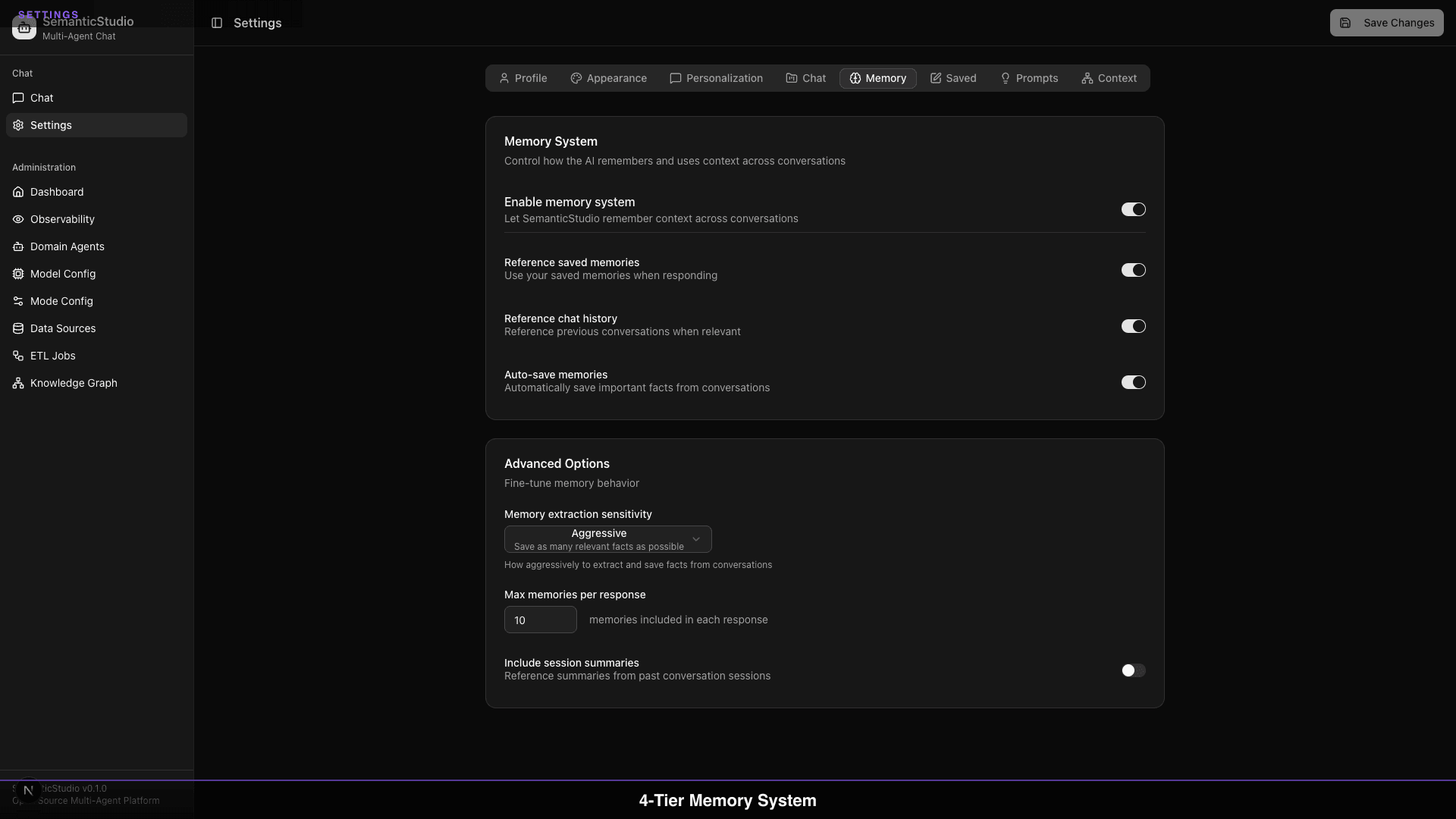
Users control their memory through settings:
Per-Tier Controls
- Working Context: Always enabled (required for coherent conversation)
- Session Memory: Toggle on/off
- Long-term Memory: Toggle on/off
- Saved Memories: View and delete specific memories
Per-Mode Memory
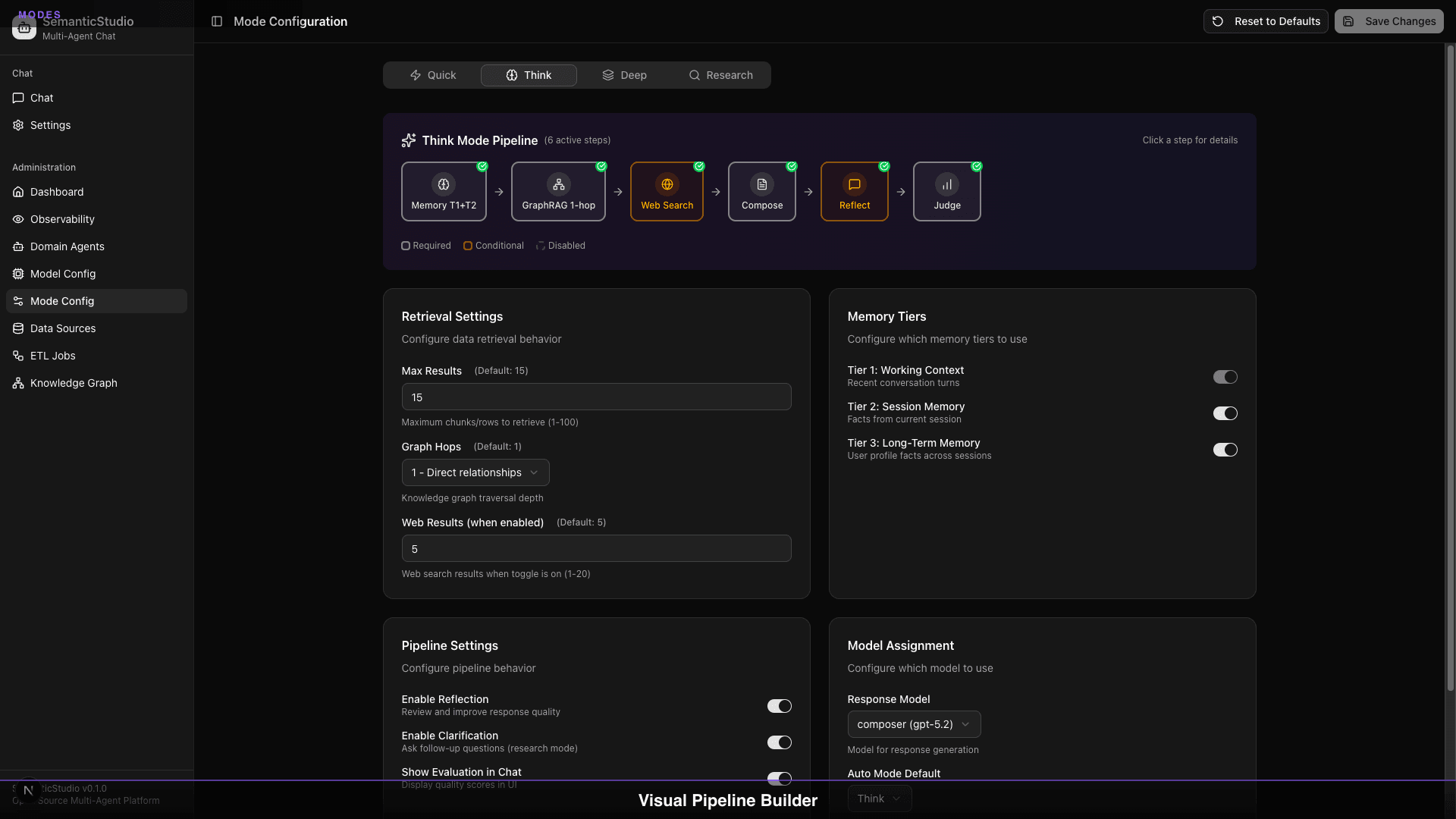
Each mode configures which tiers it uses:
| Mode | Memory Tiers | Context Graph |
|---|---|---|
| Quick | Tier 1 only | No |
| Think | Tiers 1-2 | Yes |
| Deep | All tiers | Yes |
| Research | All tiers | Yes |
Quick mode skips session, long-term, and graph retrieval for speed.
Rolling Window Compression
SemanticStudio uses progressive compression to handle unlimited conversation length. As conversations grow, older messages compress to save tokens while preserving meaning.
Rolling Window Compression
Watch messages compress as conversation grows
How it works: When messages exceed the threshold (20), older turns are compressed in batches of 6. If compression doesn't save 50%+ tokens, content is archived into the session summary.
Compression States
Messages transition through three states:
| State | Content | Token Impact |
|---|---|---|
| FULL | Complete message verbatim | 100% |
| COMPRESSED | LLM-generated summary (100-200 words) | ~50% |
| ARCHIVED | Merged into session summary only | ~10% |
Compression Triggers
- Message count: When full messages exceed 20, compression triggers
- Token budget: When total tokens exceed mode allocation
- Batch size: 6 messages (3 turns) compressed together
- Quality gate: If compression doesn't save 50%+ tokens, content is archived
Token Budget Management
The system manages token budgets automatically, with different allocations per mode:
Budget Allocation by Mode
| Component | Quick | Default | Deep |
|---|---|---|---|
| Total Budget | 4,000 | 12,000 | 24,000 |
| Full Messages | 2,500 | 6,000 | 10,000 |
| Compressed | 500 | 3,000 | 8,000 |
| Session Summary | 500 | 1,500 | 3,000 |
| Reserved Buffer | 500 | 1,500 | 3,000 |
Dynamic Adjustment
When budgets are exceeded:
- Compression: Older messages get compressed in batches
- Archival: Compressed content merges into session summary
- Prioritization: Higher-relevance content kept
The system never fails due to context overflow—it compresses gracefully.
How It All Works Together
Every turn flows through all 4 memory tiers—loading context before the response, then extracting and linking after. Here's the complete lifecycle:
Turn Lifecycle Flow
How memory processes your message through all 4 tiers
"What's the churn risk for Texas customers?"
Load Working Context
Tier 1: Always-included context loaded first
- •Last 3 conversation turns (6 messages)
- •Current session summary
- •Active system instructions
- →Turn 5: Asked about Q4 revenue
- →Turn 6: Discussed Texas region
- →Turn 7: Current query
Key insight: Every turn flows through all 4 memory tiers—loading context before the response, then extracting and linking after. This ensures you never lose important context while keeping token usage efficient.
Memory in Action
Let's trace how memory works in a real conversation:
Turn 1: User Query
User: "What was our Q4 revenue?"

Working Context:
- System prompt
- User query

Retrieval:
- Session memory: (empty - new session)
- Long-term memory: "User is Finance Manager"
- Documents: Q4 financial reports

Response: "Q4 revenue was $12.4M, up 15% from Q3..."
Turn 2: Follow-up
User: "How does that compare to our forecast?"

Working Context:
- System prompt
- Previous exchange (Q4 revenue)
- Current query

Memory Extraction:
- Fact: "Q4 revenue was $12.4M" → Session memory

Retrieval:
- Session memory: "Q4 revenue was $12.4M"
- Documents: Q4 forecast data

Response: "The $12.4M exceeded forecast by 8%..."
Turn 3: Related Question
User: "Remember, my bonus depends on hitting targets."

Working Context:
- System prompt
- Last 3 exchanges
- Current query

Memory Extraction:
- Fact: "User's bonus depends on hitting targets" → Long-term memory
  (explicitly requested save, cross-session value)

Response: "Understood. I'll keep that context in mind..."
Later Session
User: "How are we tracking against targets?"

Long-term Memory Retrieved:
- "User is Finance Manager"
- "User's bonus depends on hitting targets"

The system remembers context from previous sessions.
Privacy Considerations
Memory raises privacy questions. SemanticStudio addresses them:
User Control
- Users can disable long-term memory entirely
- Users can view and delete any saved memory
- Users can clear session memory at any time
Data Isolation
- Each user's memory is isolated
- No cross-user data leakage
- Admins cannot access user memories
Retention Policies
- Session memory clears automatically
- Long-term memory persists until deleted
- No automatic expiration (user controls retention)
Best Practices
From building and running SemanticStudio:
When to Enable Long-term Memory
Enable for:
- Users who want personalized experiences
- Workflows with recurring context
- Preference-sensitive interactions
Disable for:
- Privacy-sensitive environments
- One-time queries
- Testing and development
Optimizing Memory Extraction
The extractor works best when:
- Conversations are focused (one topic per session)
- Users are explicit about preferences
- Questions build on previous context
Token Budget Tuning
Adjust budgets based on:
- Average query complexity
- Document length in your corpus
- Response length requirements
Connection to Context Engineering
This implementation reflects principles from Context Engineering & Attention:
- Position matters: Important content in Tier 1 stays visible
- Relevance filtering: Only relevant facts retrieved
- Budget discipline: Never exceed capacity
- Strategic compression: Summarize rather than truncate
Memory tiers are context engineering in production.
What's Next
Memory determines what context is available. But for relationship-based queries, vector similarity isn't enough—you need to understand how entities connect.
Next up: Part 6 — GraphRAG-lite, where we explore knowledge graphs and relationship-aware retrieval.
Building SemanticStudio
Part 5 of 8